
ChatGPT vs Gemini (2026): Which AI Tool Is Better for Beginners, Creators & Businesses?
Introduction
A few years ago, whenever we needed an answer, we did just one thing—we googled it.
Today, that habit has changed completely.
Now, instead of searching through ten links, we simply ask an AI directly.
And that’s where the real question begins: ChatGPT vs Gemini.
Both are powerful. Both are smart. And both claim to make your life easier.
But when it comes to daily use, the real challenge is not what they can do, but which one you should actually use.
On one side, we have ChatGPT by OpenAI—the tool that started the AI revolution. It feels like talking to a calm, knowledgeable professor who explains things clearly and helps you think better.
On the other side, we have Google Gemini (formerly Bard). Backed by Google, it connects directly to the internet and feels more like a fast, always-updated assistant that pulls information from the real world instantly.
So… ChatGPT vs Gemini—which one wins?
Here’s the honest truth:
The answer is not as simple as “this one is better.”
I’ve personally been using both ChatGPT and Gemini every single day for the last 6 months—for running my business, writing client emails, planning content, researching ideas, and yes, even planning vacations.
And what I learned is this:
👉 Choosing the wrong AI for the wrong task can actually waste your time instead of saving it.
Whether you’re a student, a business owner, a freelancer, or just someone who wants to work faster, this decision matters more than you think.
That’s why, in this ChatGPT vs Gemini comparison, I’m not going to just list features or specs.
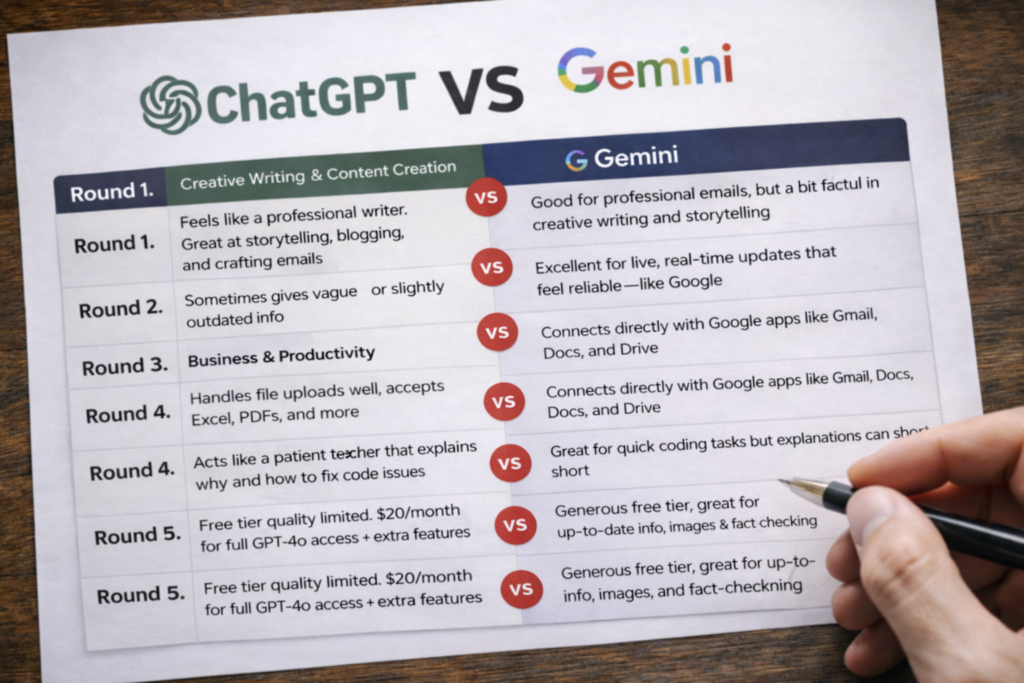
Instead, I’ll put them head-to-head in 5 real-world scenarios and show you—very practically—which AI is better for you in 2026.
No hype.
No fanboy opinions.
Just real usage and honest comparison.
Now let’s start the comparison.
Round 1: Creative Writing & Content Creation ✍️
For most people, this is the first and most common use of AI—writing blog posts, brainstorming ideas, replying to emails, or creating Instagram captions.
So naturally, the first real battle is ChatGPT vs Gemini for writing.
My Experience with ChatGPT
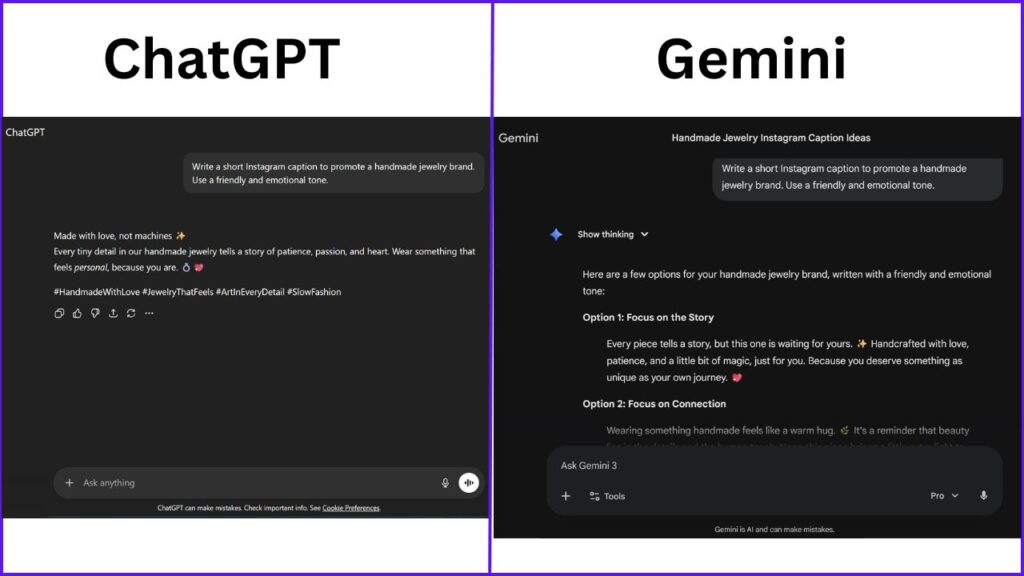
ChatGPT—especially the GPT-4o model—feels like working with a professional content writer.
When I ask ChatGPT to write something like “an important business email” or “a blog introduction,” it doesn’t just generate words—it understands tone, intent, and context.
It knows when to sound formal, when to keep things friendly, and even when a little humor is appropriate.
What I personally love is:
- Clear structure with proper headings
- Smooth flow from one paragraph to the next
- Almost never going off-topic
For long-form content like blogs, ChatGPT feels calm, thoughtful, and consistent—like someone who actually understands writing.
My Experience with Gemini
Gemini is capable, but the experience is different.
In many cases, Gemini feels more factual and straightforward. When I ask it to write creative content or a story, it often feels like it’s in a hurry—jumping too quickly to the conclusion without fully building the idea.
That said, Gemini shines in one specific area:
👉 professional, corporate-style emails.
If you want something that sounds very official, formal, and to-the-point, Gemini does a solid job. But for storytelling, blogging, or creative content, it can sometimes feel a bit… robotic.
🏆 Winner: ChatGPT
Why ChatGPT wins this round:
It understands nuance, tone, emotion, and style far better than Gemini.
If you are a:
- Content creator
- Freelancer
- Social media manager
👉 ChatGPT is the better choice for creative writing in 2026.
In the ChatGPT vs Gemini battle for content creation, ChatGPT clearly takes the lead.
Round 2: Research & Real-Time Information 🌍
This is where the ChatGPT vs Gemini debate gets truly interesting.
Creative writing is one thing.
But research and real-time information are a completely different game.
When you’re researching news, prices, trends, or anything that changes frequently, accuracy matters more than creativity.
The Problem with ChatGPT
Even in 2026, ChatGPT still has one weakness you need to be aware of:
👉 hallucinations (sometimes it confidently makes things up).
Yes, ChatGPT can browse the internet now, but in real-world usage, it can feel:
- Slightly slower
- Occasionally vague
- Sometimes dependent on older or summarized data
It’s great at explaining concepts—but when it comes to fresh news or breaking updates, it can miss details or give generalized answers.
The Power of Gemini
This is where Google Gemini shows its true strength.
Gemini is built by Google, and that connection to real-time web data is its biggest advantage.
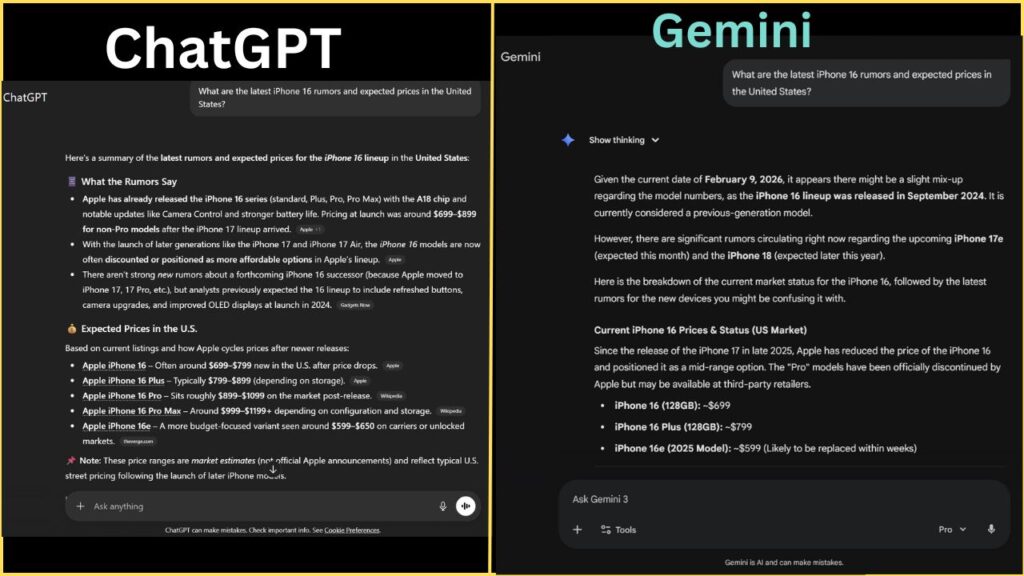
I tested both AIs with the same question:
“What are the latest iPhone 16 rumors and their expected prices in the United States?”
ChatGPT’s response:
- A general summary
- Broad information
- No clear sources
Gemini’s response:
- A clean bullet-point list
- Expected prices
- Possible release timelines
- And most importantly—direct links to trusted sources
That alone makes a huge difference.
Gemini also has a feature called “Double-Check.”
You can click the Google icon, and Gemini will actually verify its own answer against real web sources.
That makes a massive difference for trust, especially when accuracy matters.
🏆 Winner: Google Gemini
Why Gemini wins this round:
Because it’s Google.
Gemini knows what happened 5 minutes ago.
ChatGPT is improving fast—but when it comes to live updates, news, prices, and current events, Gemini is clearly ahead.
If your work depends on:
- Latest news
- Market research
- Product prices
- Trends and updates
👉 Gemini is the better choice in 2026.
In the ChatGPT vs Gemini battle for research and real-time information, Google Gemini takes the win.
Round 3: The Ecosystem (Apps & Integration) 📱
AI today is not just about chatting in a text box.
The real value comes when AI can work with your files, emails, documents, and daily tools.
This is where the ChatGPT vs Gemini comparison takes a very practical turn.
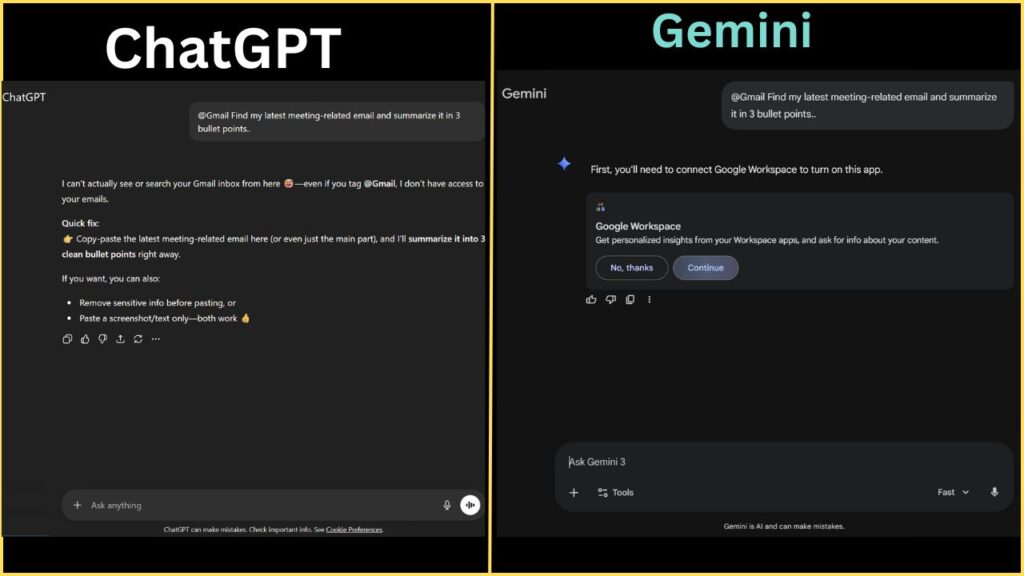
Gemini’s Biggest Edge: Google Workspace
If you already use Google Docs, Gmail, Google Drive, or Google Sheets, Gemini feels incredibly powerful—and honestly, very convenient.
Gemini is deeply integrated with Google Workspace, which means it doesn’t just answer questions—it can access and work with your existing data.
For example, you can literally type something like this inside Gemini:
@Gmail Find John’s email about last week’s meeting and summarize it
And it actually does it.
No copy-pasting.
No searching manually.
No uploading files.
Gemini can also:
- Read PDFs stored in Google Drive
- Summarize documents instantly
- Help you draft replies directly inside Gmail
- Pull context from your own files
If your daily work lives inside Google apps, Gemini feels less like an AI tool and more like a built-in assistant.
ChatGPT’s Approach: Powerful, but More Independent
ChatGPT takes a slightly different approach.
It doesn’t deeply connect to your personal Gmail or cloud storage—and that’s actually intentional for privacy reasons. But when it comes to file handling, ChatGPT is extremely strong.
You can upload:
- Excel or CSV files
- PDFs
- Word documents
- Images
And ChatGPT will:
- Analyze data
- Explain charts
- Find patterns
- Summarize long reports
For example, you can upload an Excel sheet with sales data and ask ChatGPT to:
- Find trends
- Spot errors
- Create summaries
However, unlike Gemini, ChatGPT won’t directly fetch your emails or Google Drive files unless you upload them manually.
🏆 Winner: It Depends on You
- If you use Google Docs, Gmail, and Drive daily → Google Gemini wins 🏆
- If you don’t rely heavily on Google Workspace → It’s a tie
In this ChatGPT vs Gemini round, the winner depends entirely on your ecosystem—not on which AI is “smarter.”
Round 4: Coding & Technical Tasks 💻
I’ll be honest—I’m not a professional coder.
But like many business owners and creators, I still deal with technical issues all the time. Small things like:
- A website header overlapping
- CSS not behaving properly
- A layout breaking on mobile
And this is exactly where AI becomes incredibly useful.
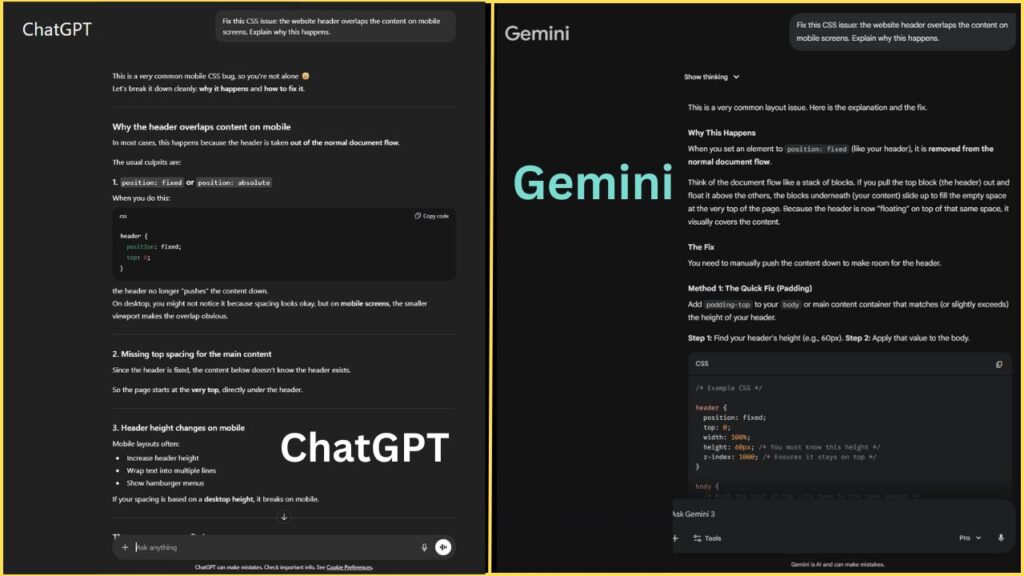
So for this round of ChatGPT vs Gemini, I tested both tools with a broken HTML/CSS code snippet related to a website header and asked them to fix it.
My Experience with ChatGPT
ChatGPT didn’t just fix the code—it taught me what went wrong.
It clearly explained:
- Why the header was breaking
- Which CSS property was causing the issue
- How to fix it step by step
- And how to prevent the same problem in the future
The explanation felt calm, patient, and beginner-friendly. Even if you don’t understand coding deeply, ChatGPT makes sure you actually learn something, not just copy-paste a solution.
My Experience with Gemini
Gemini also fixed the code—and it did it quickly.
However, the explanation was a bit short and surface-level. In my case, the first solution didn’t work perfectly, and I had to ask a follow-up question to fine-tune the code.
Gemini is efficient, but sometimes it feels like it assumes you already know what you’re doing.
🏆 Winner: ChatGPT
Why ChatGPT wins this round:
It behaves like a patient teacher, not just a problem solver.
For:
- Debugging
- Understanding logic
- Learning why something broke
- Solving complex or layered problems
👉 ChatGPT is still the better choice in 2026.
In the ChatGPT vs Gemini comparison for coding and technical tasks, ChatGPT clearly holds the crown.
Round 5: Pricing – Free vs Paid 💸
Let’s be honest—for most of us, price matters the most.
No matter how powerful an AI tool is, the real question is: what do you actually get for free?
So in this round of ChatGPT vs Gemini, let’s talk money.
ChatGPT Pricing Breakdown
Free Version
ChatGPT’s free plan gives you access to GPT-4o, which is impressive. The quality is excellent, but there are limits:
- Limited number of file uploads
- Limited image generations per day
- Usage caps during busy times
It’s great for daily tasks, but if you use AI heavily, you’ll hit those limits sooner than you expect.
Plus Plan ($20/month)
With ChatGPT Plus, most restrictions disappear:
- Much higher or near-unlimited usage
- Image generation with DALL·E 3
- Advanced voice mode
- Faster responses and priority access
If AI is part of your daily workflow, the paid plan feels worth it.
Gemini Pricing Breakdown
Free Version
This is where Gemini really surprises.
Gemini’s free version gives you access to Gemini Pro, and it feels extremely generous:
- Image generation included
- Photo analysis
- Real-time web search
- Fewer visible limits compared to ChatGPT’s free plan
For many users, the free version alone is more than enough.
Advanced Plan ($20/month)
Gemini Advanced unlocks:
- Gemini 1.5 Pro
- Much larger context window
- Deep integration with Google Docs, Gmail, and Drive
This plan is especially valuable if you already live inside Google’s ecosystem.
🏆 Winner: Google Gemini (For Free Users)
Why Gemini wins this round:
Because its free version feels far less restrictive.
If you don’t want to spend money yet and still want powerful AI features, Gemini gives you more freedom without constantly hitting limits.
In the ChatGPT vs Gemini pricing battle:
- Free users → Gemini wins 🏆
- Power users who pay → Both are strong choices
👉 Try ChatGPT (Click Here)
👉 Try Gemini (Click Here)
Comparison Table: At a Glance ChatGPT VS Gemini
| Feature | ChatGPT (OpenAI) | Google Gemini |
| Best For | Writing, Coding, Logic | Research, Live Info, Google Apps |
| Writing Quality | Creative & Human-like | Factual & Direct |
| Internet Access | Good (via Bing) | Excellent (via Google) |
| Image Generation | Yes (DALL-E 3) – Limited | Yes (Imagen 3) – Fast |
| App Integration | Upload Files | Gmail, Docs, Drive, Maps |
| Speed | Moderate | Very Fast |
The Final Verdict: ChatGPT vs Gemini — Which One Should You Choose?
After using both ChatGPT and Gemini daily for the last 6 months, here’s my final and honest answer.
This is not about which AI is “better” overall.
It’s about which one fits your way of working.

👉 Choose ChatGPT if:
You are a Blogger or Copywriter
Nothing beats ChatGPT’s writing style. Blogs, scripts, captions, emails—it understands tone, emotion, and flow better than Gemini.
You are a Coder or a Student
ChatGPT doesn’t just give answers—it explains why. For learning logic, debugging code, or understanding complex topics, it feels like a patient teacher.
You want a real conversation
ChatGPT feels natural. Talking to it feels like chatting with a smart friend who actually listens and remembers context.
👉 If writing, learning, and thinking deeply are your priorities, ChatGPT is the better choice.
👉 Choose Google Gemini if:
You need live, up-to-date information
Planning a trip, checking prices, researching news, or tracking trends—Gemini’s real-time web access makes a big difference.
You live inside Google Workspace
If your daily work happens in Gmail, Google Docs, and Drive, Gemini saves hours by working directly with your files and emails.
You want the most powerful free option
Gemini’s free version feels less restricted and more generous than ChatGPT’s free tier.
👉 If speed, real-time data, and Google integration matter most, Gemini is the smarter pick.
🧠 The Honest Truth
This isn’t a battle where one AI destroys the other.
Many people—including me—use both:
- ChatGPT for writing, thinking, coding, and creativity
- Gemini for research, live data, and Google-based work
In the end, the best AI is the one that saves you the most time.
That’s the real winner in the ChatGPT vs Gemini debate.
My Personal Strategy (What I Actually Do)
So what’s my personal strategy after using both tools for months?
I use both—and honestly, that’s the smartest approach.
I use ChatGPT to write articles like this one, organize my thoughts, build structure, and improve flow. It helps me think clearly and turn rough ideas into something readable and engaging.
Once the content is ready, I switch to Gemini.
That’s where I fact-check information, verify numbers, and look for the latest trends or updates—especially when accuracy really matters.
This combination works perfectly.
In 2026, you don’t need to be loyal to just one AI tool.
You just need to be smart enough to use the right tool for the right job.
Do that, and you’ll always stay one step ahead of the competition.
(Also, if you want to know which free tools can help you start a business, check out our guide on 5 Free AI Tools for Beginners.)
❓ Frequently Asked Questions (FAQs) – ChatGPT vs Gemini
Q1. Which is better in 2026: ChatGPT or Gemini?
There is no single winner. In the ChatGPT vs Gemini comparison, ChatGPT is better for writing, coding help, and deep explanations, while Gemini is better for real-time information, research, and Google integration.
Q2. Is ChatGPT still worth using if Gemini has live internet access?
Yes. Even though Gemini excels at live data, ChatGPT is still superior for creative writing, structured content, and problem-solving. Many users prefer ChatGPT for thinking and clarity.
Q3. Is Gemini completely free to use?
Gemini offers a very powerful free version (Gemini Pro) with image generation, web search, and fewer limits. However, Gemini Advanced is a paid plan that unlocks more advanced features.
Q4. Which AI is better for students?
For students, ChatGPT is usually better because it explains concepts step by step and helps with logic, coding, and learning. Gemini is useful for research and current information.
Q5. Which AI should bloggers and content creators choose?
If your work involves blogs, scripts, captions, or storytelling, ChatGPT wins in the ChatGPT vs Gemini comparison. Its tone, flow, and writing quality feel more human.
Q6. Can I use both ChatGPT and Gemini together?
Absolutely. Many professionals use ChatGPT for writing and structuring ideas, then use Gemini for fact-checking and finding the latest data. Using both is often the smartest strategy.
Q7. Is Gemini better than ChatGPT for business use?
It depends on your workflow. If your business relies on Google Docs, Gmail, and Drive, Gemini can save a lot of time. If your business involves writing, planning, or coding, ChatGPT may be more useful.
Q8. Does ChatGPT make mistakes or hallucinate?
Yes, sometimes. While ChatGPT is excellent at explanations, it can occasionally provide incorrect facts. That’s why cross-checking with Gemini or trusted sources is a smart practice.





2 Comments