
3 Best Free AI Presentation Makers (2026): Create PPTs in Minutes, Not Hours
Do you remember those days when you used to sit in front of PowerPoint until 1 or 2 in the morning, just to create a simple presentation?
You start with motivation, but slowly things become frustrating.
Sometimes the slide design doesn’t look professional, sometimes the content feels boring, and sometimes you keep adjusting fonts, colors, and layouts again and again. At one point, you ask yourself:
“Why is creating a simple PPT taking so much time?”
If you are a student working on assignments, an office employee preparing reports, a teacher creating lectures, or a freelancer pitching to clients, then you already know how stressful presentation creation can be.
But here’s the good news 👇
In 2026, creating presentations is no longer about hard work — it’s about smart work.
Thanks to advanced AI tools, you no longer need to spend hours designing slides. A free AI presentation maker can now create complete presentations for you automatically. From content writing and slide structure to design, layout, and visuals, everything is handled by AI in just a few minutes.
Today, AI is not limited to generating text or images. It can understand your topic, organize information logically, and turn it into a professional, ready-to-use presentation—even if you have zero design skills.
In this blog, I will guide you step by step and help you understand how modern AI tools are changing the way presentations are created.
You will learn:
- What is a presentation maker?
Understand what a presentation maker is and how a free AI presentation maker can automatically turn your ideas or text into professional slides. - The 3 best AI PPT tools of 2026
A detailed look at the top AI-powered presentation tools that save time, improve design quality, and work perfectly for students, professionals, teachers, and freelancers. - Which AI presentation tool is right for you?
Not every tool is made for everyone. I’ll help you choose the best option based on your needs—whether you want quick results, advanced customization, or completely free usage. - How to create a presentation with AI in just 5 minutes
A simple, beginner-friendly process that shows how you can use AI to create a complete presentation—content, design, and layout—within minutes.
By the end of this blog, you’ll know exactly how to use AI to create stunning presentations without wasting hours on PowerPoint.
What Is an AI Presentation Maker and Why Should You Use It?
An AI presentation maker is a smart tool that uses artificial intelligence to automatically create presentations for you. Instead of starting from scratch, you simply enter your topic, a few keywords, or short instructions—and the AI takes care of everything.
With a free AI presentation maker, you no longer need to worry about content writing, slide structure, or visual design. The AI understands your topic, creates meaningful content, selects suitable layouts, adds relevant visuals, and delivers a complete presentation in minutes.
In the traditional method, creating a PowerPoint presentation usually means:
- Staring at a blank slide with no idea where to start
- Searching for content on Google for hours
- Downloading images from different websites
- Manually adjusting fonts, colors, and slide designs
This entire process is not only time-consuming, but also extremely frustrating—especially when deadlines are tight.
That’s why more students, professionals, teachers, and freelancers are switching to AI tools. An AI presentation maker saves time, reduces stress, and helps you create professional-quality presentations without any design experience.
How Does an AI Presentation Maker Work?
An AI presentation maker works by using artificial intelligence to understand your topic and automatically convert it into a complete presentation. Instead of manually handling every step, the AI takes care of the entire workflow for you.
Here’s how most AI PPT tools work:
- You simply write the topic
You start by entering your topic, headline, or a short description of what the presentation is about. - The AI conducts research on its own
The tool analyzes your topic, gathers relevant information, and understands what content should be included in the slides. - It creates a slide outline automatically
The AI organizes the information into a clear structure—title slide, introduction, key points, and conclusion. - Design, layout, and images are added automatically
The AI selects professional templates, matching colors, fonts, icons, and images to make the presentation visually appealing.
👉 This means your 5–6 hours of manual work can be completed in just 5 to 10 minutes.
That’s why by 2026, free AI presentation maker tools have become a faster, smarter, and more reliable option for students, professionals, teachers, and businesses worldwide.
1. Gamma AI – A Fast and Professional AI Presentation Maker
If you’re looking for a simple, clean, and modern-looking presentation, then Gamma AI is a solid and reliable option. It is especially popular among professionals who want high-quality presentations without spending hours on design.
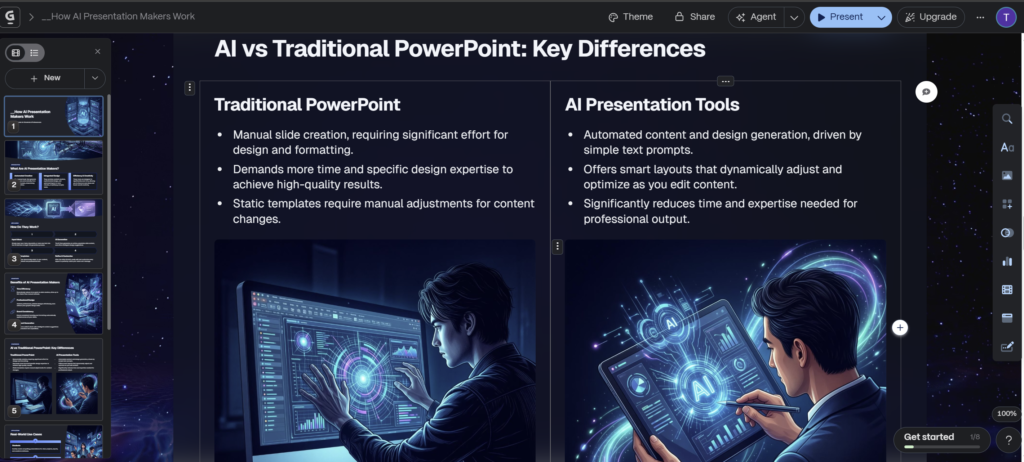
Gamma takes a slightly different approach compared to traditional slide-based tools. Instead of forcing you to design each slide manually, it treats your presentation like a smart document. Once the content is ready, Gamma automatically converts it into well-structured, visually appealing slides.
This makes Gamma an excellent choice for people who care more about content and clarity than manual design work.
Why Is Gamma AI So Popular?
- One-click PPT generation
You simply write your topic or prompt, and Gamma’s AI instantly creates a complete presentation for you. - Automatic layout system
The design, spacing, and layout adjust automatically based on your content, so every slide looks clean and balanced. - Modern and professional design
Gamma uses minimal, modern templates that are perfect for business, startups, and client presentations. - Sharing and analytics features
You can easily share your presentation and even see who is viewing it—something traditional PPT tools don’t offer.
Personally, I’ve used Gamma AI in real client presentations, and honestly, the output looks very professional and polished. If you’re searching for a free AI presentation maker that delivers clean results quickly, Gamma is definitely worth trying.
Pros & Cons of Gamma AI
✅ Pros
- Beginner-friendly interface
Gamma AI is very easy to use, even if you have never used an AI presentation tool before. - PPT & PDF export options
You can export your presentations in both PowerPoint and PDF formats, making it suitable for office, school, and client use. - Clean and modern design
The templates are minimal, professional, and visually appealing—perfect for business and professional presentations.
❌ Cons
- Limited advanced animations
If you need heavy animations or complex transitions, Gamma AI may feel a bit limited compared to traditional PowerPoint.
⭐ My Recommendation
If your goal is to create professional-looking presentations quickly, without worrying about design or layout, Gamma AI is an excellent choice. For students, professionals, teachers, and freelancers who want speed and simplicity, this free AI presentation maker is highly recommended.
It’s especially useful for client presentations, reports, pitch decks, and business meetings, where clean design matters more than flashy animations.
👉 Try Gamma AI (Click Here)
2. Canva Design – Design Lovers’ Favorite AI Presentation Maker
If you have used Canva before, Canva Design will feel instantly familiar. It’s one of the most popular tools among people who love visual design, creativity, and customization.
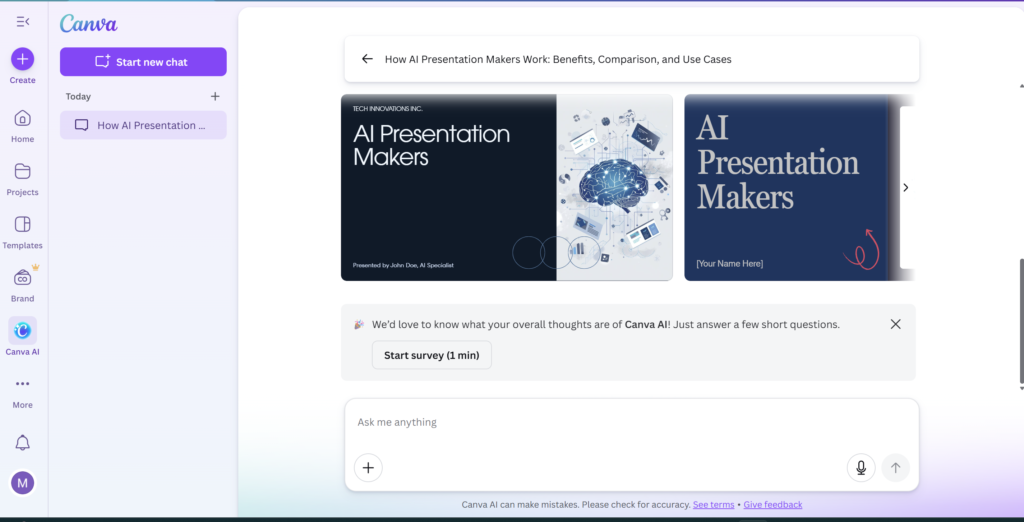
With Canva’s AI-powered design feature, you simply write your text or idea, and Canva automatically converts it into beautiful, visually appealing slides. You don’t need to start from a blank slide or worry about layout and colors.
Canva Design is perfect for users who want full creative control along with AI assistance.
How Does Canva Design Work?
- Canva instantly shows you multiple ready-made slide designs based on your text.
- You can choose any design and edit everything—text, images, fonts, colors, animations, and layout.
- The AI helps with structure, while you stay in control of the final look.
Key Features of Canva Design
- Brand Kit support
Easily use your logo, brand colors, and fonts to maintain brand consistency. - Huge image & graphics library
Access millions of stock images, icons, illustrations, and design elements. - Team collaboration
Work with your team in real time—edit, comment, and share presentations easily.
Canva Design — Pros & Cons
✅ Pros
✔ Extremely beginner-friendly
Canva is very easy to use, even for first-time users with zero design experience.
✔ Best-in-class design flexibility
You can fully customize text, images, fonts, colors, layouts, and animations.
✔ Huge image & graphics library
Access millions of stock photos, icons, illustrations, charts, and elements.
✔ Brand Kit support
Perfect for businesses—use your logo, brand colors, and fonts consistently.
✔ Excellent team collaboration
Multiple users can edit, comment, and collaborate in real time.
✔ Works as a free AI presentation maker
You can generate and design presentations quickly using Canva’s AI features.
❌ Cons
✖ Too many design choices can be distracting
For users who want quick results, excessive customization may slow things down.
✖ Advanced features require Canva Pro
Some premium templates, images, and brand tools are locked behind the paid plan.
✖ Not fully storytelling-focused
Compared to tools like Tome, Canva is more design-oriented than narrative-driven.
⭐ Recommendation
If design, graphics, and visual creativity are your top priorities, Canva is one of the best choices available. For creators, marketers, teachers, and social media professionals, Canva works as a powerful free AI presentation maker with unmatched design flexibility.
👉 Try Canva AI (Click Here)
3. Tome AI – Storytelling and Pitch Deck Expert
Simply creating slides is not always enough. Sometimes, you need to tell a powerful story—to investors, clients, or your audience. This is exactly where Tome AI stands out.
Tome is designed for storytelling, pitch decks, and narrative-based presentations. Instead of focusing only on slides, it helps you structure your ideas in a way that flows naturally from one point to the next, making your presentation more engaging and persuasive.
This makes Tome AI a favorite choice for startup founders, marketers, and professionals who want to create presentations that feel modern and impactful.
Special Features of Tome AI
- AI-generated images (DALL·E integration)
Tome can generate unique, high-quality visuals using AI, making your slides more original and engaging. - Dynamic content support
You can embed live content such as websites, tweets, videos, and interactive elements directly into your presentation. - Futuristic and modern look
Tome offers a sleek, next-generation design style that feels different from traditional PowerPoint slides.
✅ Pros
✔ Story-Driven Presentations
Tome AI helps you create presentations that feel like a narrative — perfect for pitch decks, investor stories, and persuasive talks.
✔ AI-Generated Images (DALL·E Integration)
Get unique visuals automatically generated, instead of searching stock images.
✔ Dynamic & Interactive Content
You can embed live websites, tweets, videos, and more — making your slides richer and engaging.
✔ Futuristic & Modern Look
Presentations feel fresh and visually impressive — standing out from traditional PPT designs.
✔ Great for Pitch Decks & Startups
If you’re pitching an idea, storytelling is essential, and Tome makes that easier.
❌ Cons
✖ Less Suitable for Simple Slides
If you just want a basic business presentation, the storytelling features may feel too heavy.
✖ Best Features May Require Paid Plan
Some advanced dynamic integration options might not be available in the free version.
✖ Learning Curve for Beginners
Because it focuses on narrative structure and interactive elements, beginners might take a little time to fully explore its capabilities.
⭐ Decision
If your main goal is to tell a story, pitch an idea, or impress investors, Tome AI is an excellent option. For users who want more than static slides, Tome works as a creative and innovative free AI presentation maker—especially for pitch decks and storytelling-focused presentations.
👉 Try Tome AI (Click Here)
Comparison Table – Which AI PPT tool is the best?
| Feature | Gamma AI | Canva Magic | Tome AI |
|---|---|---|---|
| Best For | Students & Work | Design & Marketing | Startups & Storytelling |
| Ease of Use | ⭐⭐⭐⭐⭐⭐⭐⭐ | ⭐⭐⭐⭐⭐⭐⭐⭐⭐⭐ | ⭐⭐⭐⭐⭐⭐⭐⭐ |
| Design Quality | Modern & Clean | Excellent & Customizable | Futuristic & Narrative |
| AI-Generated Images | Limited | Yes (Built-In Library + AI Tools) | AI Generated (DALL·E) |
| Content Generation | Strong | Strong | Strongest for Storytelling |
| Dynamic Content | ❌ | ❌ | ✔ Embed Websites, Tweets, Videos |
| Export Options | PPT / PDF | PPT / PDF | PDF (Limited PPT) |
| Brand Kit Support | ❌ | ✔ Yes | ❌ |
| Team Collaboration | Basic | ✔ Excellent | Good |
| Free Plan | ✔ Yes | ✔ Yes | ✔ Yes |
| Best Suited For | Quick, professional slides | Visual creatives, marketing decks | Pitch decks, narrative presentations |
⭐ Key Highlights
✅ Gamma AI:
- Best for students, office presentations, reports, work summaries
- Fastest path from idea → slides
- Simple UX + minimal design = professional results
- Great free AI presentation maker for quick tasks
✅ Canva Magic:
- Perfect for designers, content creators, marketers
- Huge visual library + brand kit support
- Full creative control over layout/colors
- Ideal when design quality matters most
✅ Tome AI:
- Excellent for storytelling & pitch decks
- AI-generated visuals + dynamic embeds
- Great choice for investors, founders, presentations that need narrative flow
How to Create a PowerPoint Presentation with AI in Just 5 Minutes (Step by Step)
Let’s understand how you can create a complete PowerPoint presentation using AI in just 5 minutes.
For this example, we’ll use Gamma AI, one of the best free AI presentation maker tools available in 2026.
✅ Step 1: Sign Up & Start a New Project
- Go to Gamma.app and Website
- Sign up or log in using your email or Google account
- Click on “Create New” to start a fresh presentation
This will take you directly to the AI creation screen.
✅ Step 2: Write a Clear Prompt
Now, simply tell the AI what kind of presentation you want.
Example Prompt:
Create an 8-slide presentation on the Future of AI for college students.
The clearer your prompt, the better the presentation AI will generate.
✅ Step 3: Review the AI-Generated Outline
- Gamma AI will instantly create a slide-by-slide outline
- You’ll see headings like introduction, key points, examples, and conclusion
- You can edit, remove, or rename any slide heading at this stage
This step ensures the structure matches your exact requirement.
✅ Step 4: Select a Theme & Generate Slides
- Choose a color theme and design style
- Click on “Generate”
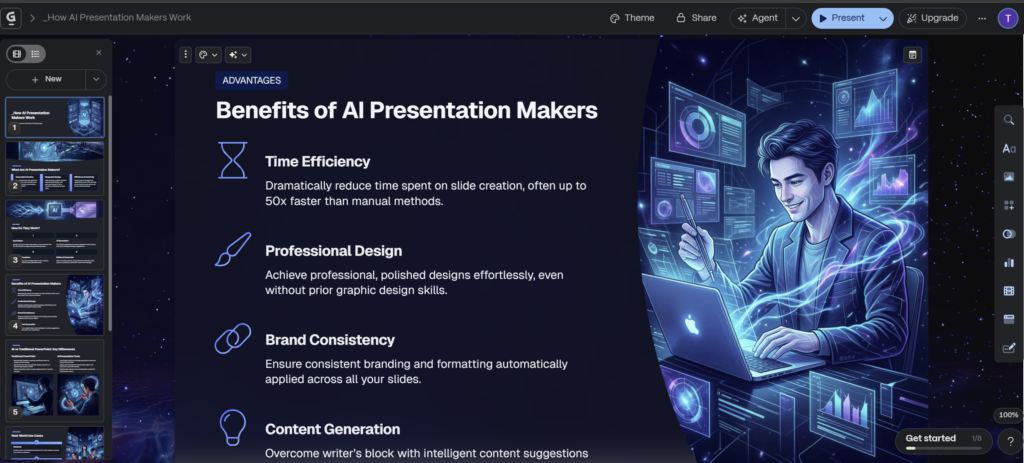
Gamma AI will now automatically:
- Write the content
- Design the layout
- Add visuals and formatting
All slides are created within seconds.
✅ Step 5: Edit & Download the Presentation
- Make small text edits if needed
- Adjust headings or bullet points
- Download the presentation in PPT format
🎉 That’s it! Your professional PowerPoint is ready—without spending hours.
💡 Tips: How to Make AI PPTs Even Better
To get the best results from any free AI presentation maker, follow these simple tips:
- Read the final content once yourself
This helps you catch small mistakes or improve clarity. - Rewrite generic lines in your own words
Personal touches make the presentation feel more natural and human. - Manually improve visuals on key slides
Especially the title slide, summary slide, or conclusion—add emphasis where it matters.
Conclusion – Creating Presentations Is No Longer Stressful
Creating presentations in 2026 no longer needs to feel like a stressful or time-consuming task. If you are still manually creating PowerPoint slides—adjusting every text box, fixing alignment, choosing colors, and searching for images—then honestly, you are wasting your valuable time.
The true purpose of technology is not to increase hard work, but to enable smart work. And that is exactly what modern AI presentation makers are doing today.
AI tools like Gamma AI, Canva, Tome, and other AI-based presentation creators completely transform the way we work. Instead of struggling with design and formatting, you simply provide your topic and a few basic ideas, and the AI takes care of the rest:
- It writes well-structured content
- It designs professional layouts automatically
- It adds relevant visuals and formatting
As a result, a task that once took 3–4 hours can now be completed in just 5–10 minutes using a free AI presentation maker.
Personally, Gamma AI is my favorite tool because it offers a fast, clean, and distraction-free experience—especially when creating client presentations or office reports. However, if your priority is design, graphics, and creative freedom, then Canva is also a top-class option that is extremely beginner-friendly. And if you are building pitch decks or storytelling presentations, Tome AI is a powerful choice.
The best part is that AI tools do not make you lazy. Instead, they make you more confident, more prepared, and more focused. When the stress of design and formatting is removed, you can invest your energy where it truly matters—your message, storytelling, delivery, and impact.
So in 2026, the real question is not: Should we use AI or not?
The real question is: How far do you want to go by saving your time?
Stop being afraid of presentations. Start working smarter—with AI.

👉 Now you tell me:
Will you start creating PPT with AI?
Share your experience in the comments!
( If you want to create presentations and your website without coding,
then you should definitely read our detailed guide:
Best AI Website Builders of 2026. )
( AI tools are not limited to presentations anymore.
If you want to learn how to create images using AI,
then our article Best Free AI Image Generators 2025
will be helpful for you. )
❓ Frequently Asked Questions (FAQ) – Free AI Presentation Makers (2026)
1. What is a free AI presentation maker?
A free AI presentation maker is a tool that uses artificial intelligence to automatically create presentations. You just enter your topic or prompt, and the AI generates the content, slide structure, design, and visuals for you—saving hours of manual work.
2. Can I really create a PPT in just 5–10 minutes using AI?
Yes, absolutely. With tools like Gamma AI, Canva, and Tome, a presentation that normally takes 3–4 hours can be created in 5–10 minutes using a free AI presentation maker.
3. Are AI presentation makers suitable for students?
Yes. AI presentation tools are perfect for students, especially for assignments, seminars, and projects. A free AI presentation maker helps students focus more on understanding the topic instead of wasting time on slide design.
4. Which is the best free AI presentation maker in 2026?
The best AI presentation maker depends on your needs. Gamma AI is great for students and office work, Canva is perfect for design and visuals, and Tome AI works best for storytelling and pitch decks. All of them offer free plans.
5. Can I download AI-generated presentations in PowerPoint format?
Yes. Most tools like Gamma AI and Canva allow you to download presentations in PPT and PDF formats. Some tools may have limited export options in their free plan.
6. Do I need design skills to use AI presentation tools?
No. One of the biggest benefits of a free AI presentation maker is that no design skills are required. The AI automatically handles layout, colors, fonts, and visuals.
7. Are AI presentation makers safe to use for office or client work?
Yes. AI tools are widely used for office presentations, client pitches, reports, and meetings. You can always review and edit the content before presenting, which makes them safe and reliable.
8. Will AI replace PowerPoint completely?
No, AI will not replace PowerPoint, but it will change how we use it. AI tools make presentation creation faster, while PowerPoint is still useful for final edits and offline use. Together, they make your workflow smarter.
9. Are free AI presentation makers really free?
Most tools offer a free plan with basic features. Advanced designs, exports, or branding options may require a paid upgrade, but the free version is more than enough for beginners.
10. Should I still learn PowerPoint if I use AI tools?
Basic PowerPoint knowledge is helpful, but AI tools reduce dependency on manual PPT skills. In 2026, knowing how to use AI smartly is more important than mastering slide design from scratch.




One Comment