
No Coding Needed: 3 Best Free AI Website Builders of 2026 (Tested & Compared Honestly)
A few years ago, building a website felt complicated. You either had to learn coding or spend a lot of money hiring a developer.
Honestly, I believed the same thing for a long time. Website building always felt like a job meant only for professional developers.
But in 2026, everything has changed.
Over the past few weeks, I personally tested several tools to find the best free AI website builders that actually work in real life — not just in advertisements. Some tools looked good on the surface but failed in practice, while a few genuinely impressed me with their results.
If you are a small business owner, freelancer, coach, content creator, or a complete beginner, this guide will help you save time, money, and unnecessary confusion.
In this article, I’m sharing the 3 best free AI website builders of 2026 that can help you create a professional-looking website in just a few minutes — without any coding skills.
So, let’s get started and explore the 3 best free AI website builders of 2026.
Why Are AI Website Builders So Popular in 2026?
Before talking about specific tools, let’s be honest about one thing — why are so many people switching to AI website builders instead of hiring developers?
Based on my personal testing and real-world experience, there are three clear reasons why best free AI website builders are becoming so popular in 2026.
1. Speed
Building a traditional website usually takes two to three weeks, sometimes even longer if revisions are involved.
While testing different AI tools, I was able to generate a complete website in less than one minute. This kind of speed was unimaginable just a few years ago.
2. Budget-Friendly
Hiring a developer can easily cost anywhere between $150 to $500 or even more for a basic website.
On the other hand, most of the best free AI website builders either offer free plans or charge around $10–$20 per month, making them affordable for beginners and small businesses.
3. No Technical Skills Needed
You don’t need to know coding, design, or any technical jargon.
If you can upload images, type text, or use social media, you can create a website. Drag-and-drop editors and AI-generated layouts make the entire process simple and beginner-friendly.
The 3 Best AI Website Builders of 2026 (My Honest Picks)
After testing multiple platforms hands-on, these three tools clearly stood out from the rest in terms of performance, ease of use, and overall value.
1. Durable AI: King of Speed (Best for Local Businesses)
If speed is your top priority, Durable AI easily stands out among the best free AI website builders available in 2026.
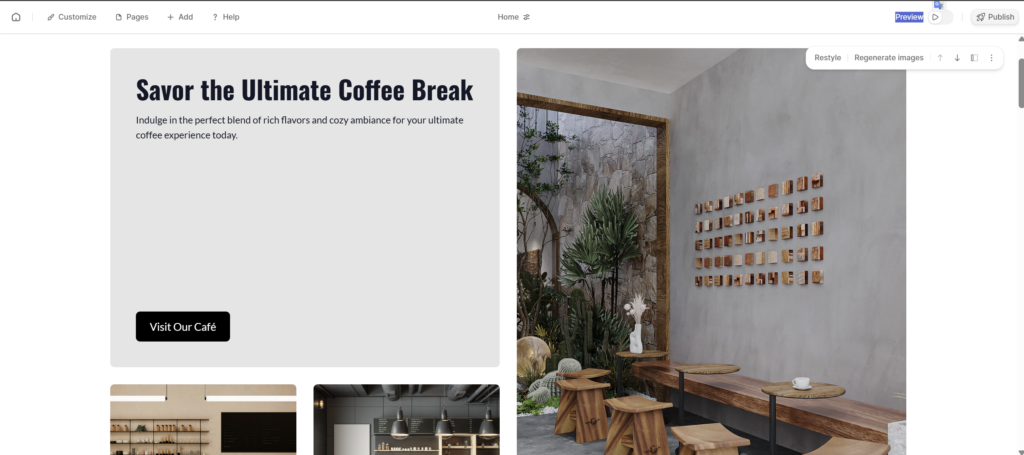
When I tested Durable AI for a sample local business website, the result genuinely surprised me. I answered just two simple questions, pressed enter, and the website was ready almost instantly. There was no waiting time, no complicated setup, and no technical confusion.
This makes Durable AI especially powerful for local businesses that want to get online quickly without spending weeks on development.
How Durable AI Works
Durable AI keeps the process extremely simple. It only asks two questions.
First, it asks what type of business you run, such as a bakery, digital marketing agency, salon, real estate business, or any other local service.
Second, it asks for your business name.
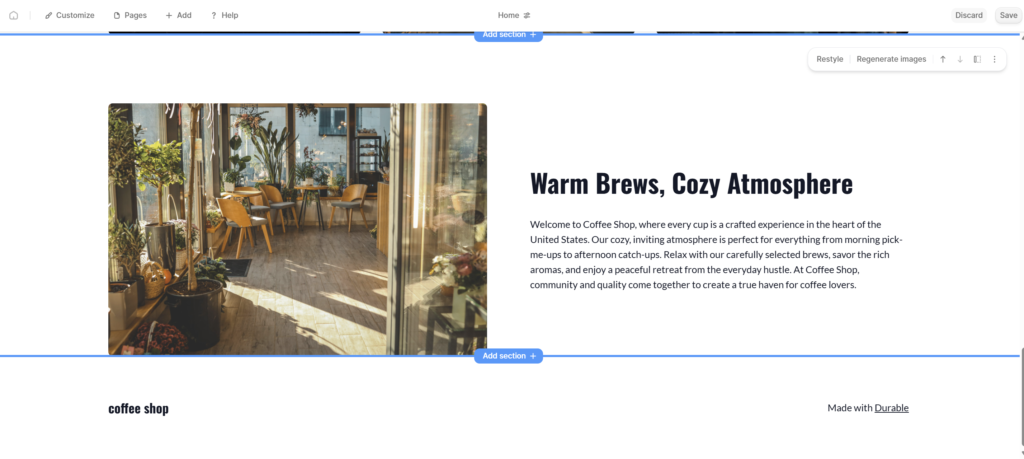
That’s it. Within seconds, Durable AI automatically generates a complete website. This includes professional-quality text, clean layouts, relevant high-quality images, a services section, and even a ready-to-use contact form with basic details already filled in.
For beginners, this feels almost like best.
Key Features of Durable AI
- 30-Second Website Generation: Durable AI can create a complete website in under 30 seconds, making it one of the fastest tools among the best free AI website builders.
- Built-in CRM System: All customer inquiries submitted through contact forms are automatically saved, helping you manage leads easily.
- Invoicing Feature: You can create and send invoices directly from the dashboard without using third-party tools.
- AI Blog Builder: Durable can generate SEO-optimized blog posts to support content marketing and organic traffic growth.
- All-in-One Business Platform: Website, leads, content, and billing are managed from a single dashboard.
Pros & Cons of Durable AI
Pros:
- Extremely fast website creation
- Very beginner-friendly, no technical knowledge required
- Includes business tools like CRM and invoicing
- Ideal for local and service-based businesses
Cons:
- Limited design customization options
- Not ideal for users who want full creative control
- Advanced design edits are restricted
My Honest Advice
If you run a local service business such as a plumber, gym owner, salon, consultant, coach, or cleaning service, Durable AI is one of the fastest and easiest ways to get online. For speed and simplicity, it truly earns its place among the best free AI website builders of 2026.
👉 Try Durable AI here (Click Here)
2. Wix Studio (Wix AI) – Best Balance of Power & Control
You’ve probably heard of Wix before, but in 2026, Wix is no longer just a basic drag-and-drop website builder. With Wix Studio and its AI-powered features, it has evolved into one of the best free AI website builders for users who want both speed and creative freedom.
Wix AI is powerful, flexible, and feature-rich. That said, I’ll be honest — it does require a little time to learn, especially if you’ve never used a professional website builder before.
My Experience with Wix AI
- When I first opened the Wix Studio editor, it felt slightly overwhelming due to the large number of tools and customization options.
- After spending a few hours exploring the platform, everything started to make sense.
- I quickly understood why designers, store owners, and brand builders prefer Wix.
- Wix offers the perfect combination of AI-powered speed and full creative control, something many AI builders struggle to balance.
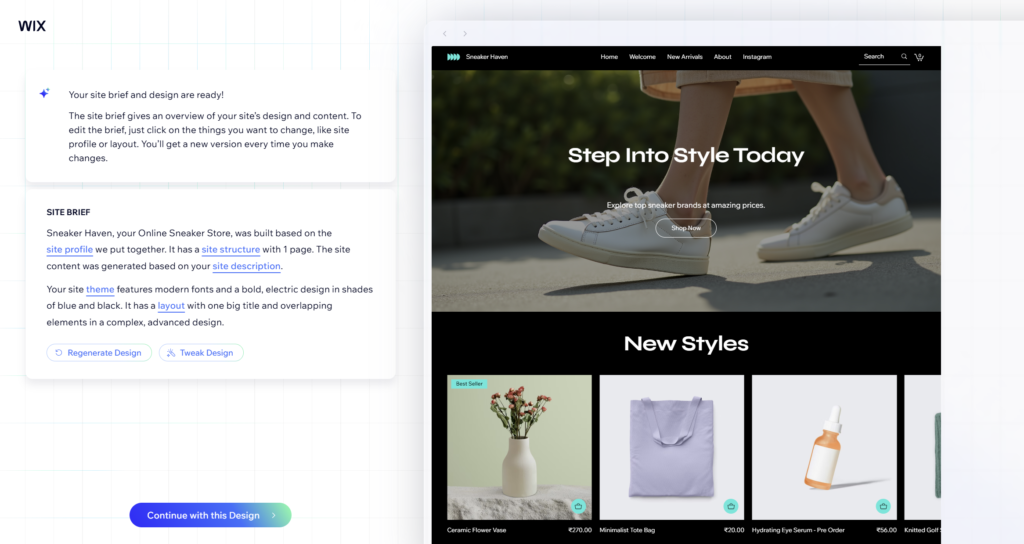
Amazing Features of Wix AI
- Chat-to-Build Website:
You can literally build a website by chatting with the Wix AI assistant. For example, you can type something like:
“Create a shoe store website with a dark, energetic theme.”
The AI then generates layouts, sections, and design ideas based on your prompt. - AI Text Creator:
If writing content feels confusing or time-consuming, Wix AI can generate headlines, product descriptions, landing page text, and complete paragraphs that sound natural and engaging. - AI Image Enhancer:
Blurry or low-quality product images can be improved using Wix’s AI image enhancement tools, making them sharper and more professional-looking. - SEO Wiz:
This is one of Wix’s strongest features. SEO Wiz gives you a step-by-step checklist to help your site rank on Google. It also suggests keywords, meta titles, and meta descriptions, making SEO beginner-friendly. - Advanced E-commerce Tools:
Wix AI is especially strong for online stores, offering product management, payment integrations, and automation tools.
Pros & Cons of Wix Studio (Wix AI)
Pros:
- Full creative control over design, layout, and content
- Excellent for e-commerce stores, portfolios, and brand websites
- Powerful AI tools combined with manual customization
- Mobile app available for managing your website on the go
Cons:
- Editor can feel heavy or slow on low-end devices
- Large number of features can be confusing for beginners
- New users may need 1–2 days to fully understand the interface
My Honest Advice
If design quality truly matters to you — whether you’re building an online store, personal portfolio, or a serious brand website — Wix Studio with AI is absolutely worth the effort. Among the best free AI website builders, Wix offers the strongest balance between automation and creative control.
👉 Try Wix AI here (Click Here )
3. Framer AI – Designers’ Favorite (Premium Look)
Framer AI is very different from traditional website builders. While most tools focus on business features, Framer focuses on how your website feels.
If your goal is to build a website that looks like it was crafted by a high-end designer, Framer AI is one of the most impressive options among the best free AI website builders.
When I tested Framer using a simple prompt, the results honestly surprised me. The layout, typography, spacing, and animations all looked clean, modern, and truly premium — without touching a single line of code.
Why Framer AI Feels Special
- Framer prioritizes visual quality over business tools
- Design feels modern, minimal, and high-end
- Animations are smooth and professional by default
- Perfect for users who care deeply about aesthetics
Unlike many builders, Framer doesn’t feel templated. Every site feels custom and well-crafted.
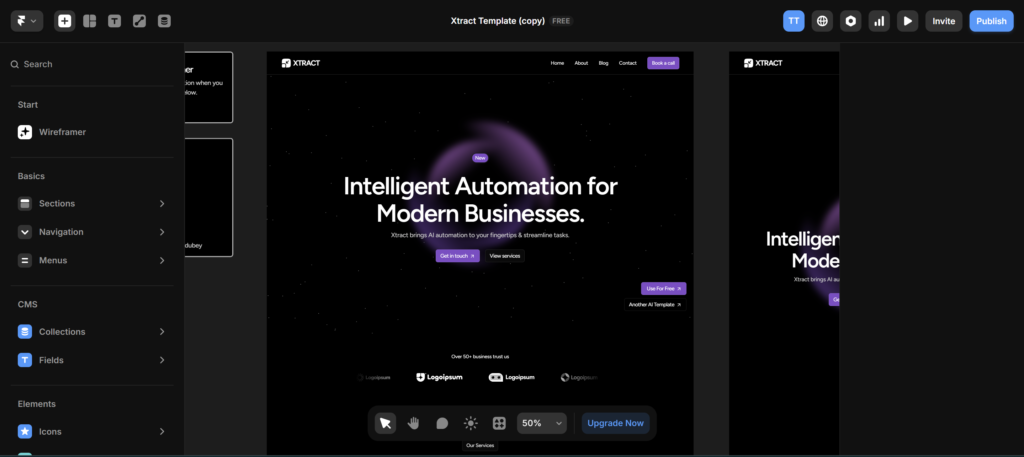
Key Features of Framer AI
- One-Prompt Website Generation:
Just describe your website idea in one prompt, and Framer AI generates a complete, visually polished website instantly. - Freeform Canvas:
Framer does not lock you into a strict grid system. You get creative freedom to place elements naturally, just like a real design tool. - High-Quality Animations Without Code:
Built-in animations and transitions look smooth and premium, without needing JavaScript or CSS knowledge. - “Shuffle” Design Feature:
With one click, you can remix layouts, colors, and typography until you find a style that fits your brand perfectly. - Lightning-Fast Performance:
Websites built with Framer load extremely fast, which is great for user experience and SEO.
Pros & Cons of Framer AI
Pros:
- World-class design and visual quality
- Clean typography and modern layouts
- Extremely fast page loading speed
- Ideal for portfolios, SaaS websites, and agencies
- Strong choice for premium-looking brands
Cons:
- Learning curve for beginners with no design background
- Limited business tools compared to other builders
- Not very strong for e-commerce websites yet
My Honest Advice
If you’re a designer, creative agency, SaaS founder, or someone building a premium portfolio, Framer AI is an excellent choice. Among the best free AI website builders, Framer stands out for design quality and professional visual experience.
👉 Try Framer AI here (Click Here)
Quick Comparison Table
Feeling Confused? No Problem. This detailed comparison table will help you choose the best free AI website builder of 2026 based on your needs, skills, and goals.
| Tool Name | Speed | Design Control | Ease of Use | Best For | Key Strength | Main Limitation |
|---|---|---|---|---|---|---|
| Durable AI | ⭐⭐⭐⭐⭐⭐⭐⭐ | ⭐⭐⭐ | ⭐⭐⭐⭐⭐⭐⭐⭐ | Local businesses & services | Extremely fast setup, CRM & invoicing included | Limited design customization |
| Wix Studio (Wix AI) | ⭐⭐⭐⭐⭐⭐ | ⭐⭐⭐⭐⭐⭐⭐⭐ | ⭐⭐⭐⭐⭐ | Online stores, brands, portfolios | Full creative control + strong e-commerce tools | Learning curve, editor can feel heavy |
| Framer AI | ⭐⭐⭐⭐⭐⭐⭐ | ⭐⭐⭐⭐⭐⭐⭐⭐ | ⭐⭐⭐⭐ | Designers, SaaS, premium portfolios | World-class design & animations | Not ideal for e-commerce yet |
Final Thoughts: Which One Should You Choose?
There is no single “best” option that works perfectly for everyone. The right choice depends on what you actually need from a website builder.
- Choose Durable AI if your priority is speed and simplicity. It’s ideal for local service businesses that want to get online as fast as possible.
- Choose Wix Studio (Wix AI) if you want full control, scalability, and strong e-commerce features for long-term growth.
- Choose Framer AI if design quality and a premium, high-end look matter more than business tools.
One thing is clear in 2026: AI website builders are no longer just hype. The best free AI website builders are now genuinely powerful tools that can replace weeks of manual work.
If your goal is to launch a professional website quickly, without coding, and without wasting time, these tools can easily save you weeks of effort and help you get online faster than ever.
Step-by-Step: How to Create a Website Using AI
Now that you’ve chosen your tool, let’s understand the actual process. The good news is that these steps are almost the same across most of the best free AI website builders in 2026.
Step 1: Write the Prompt (Tell the AI What You Need)
Everything starts with your prompt. AI works best when your instructions are clear and specific. The more details you give, the better the website will look.
- Bad prompt:
Create a website. - Good prompt:
Create a modern website for a coffee shop with “Menu” and “About Us” sections, using warm brown and beige colors, and a friendly, welcoming tone.
Think of the prompt as explaining your idea to a designer. Clear direction always leads to better results.
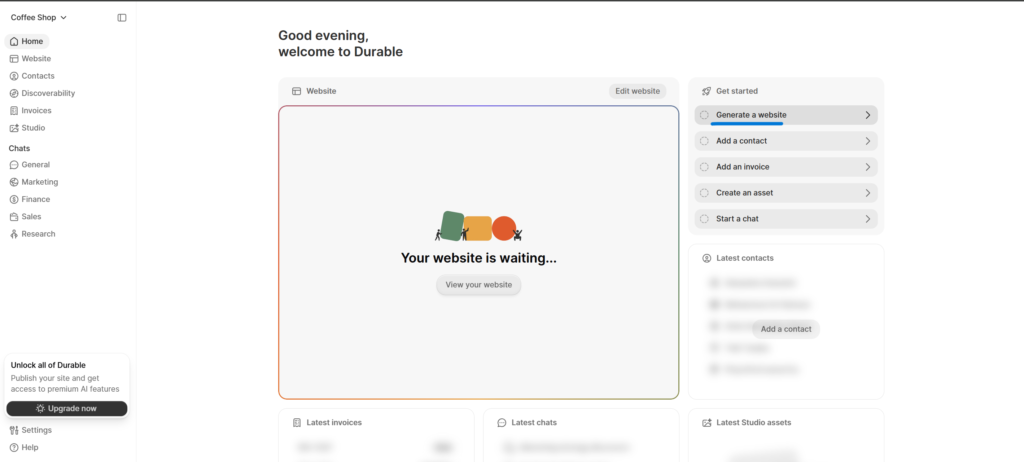
Step 2: Generate and Review the First Draft
Once you submit the prompt, the AI takes a few seconds to generate your website.
- You’ll see a complete first draft with layout, text, images, and sections.
- Don’t worry if it’s not perfect at first.
- This is just the starting point, not the final version.
Most best free AI website builders are designed for iteration, not perfection on the first try.
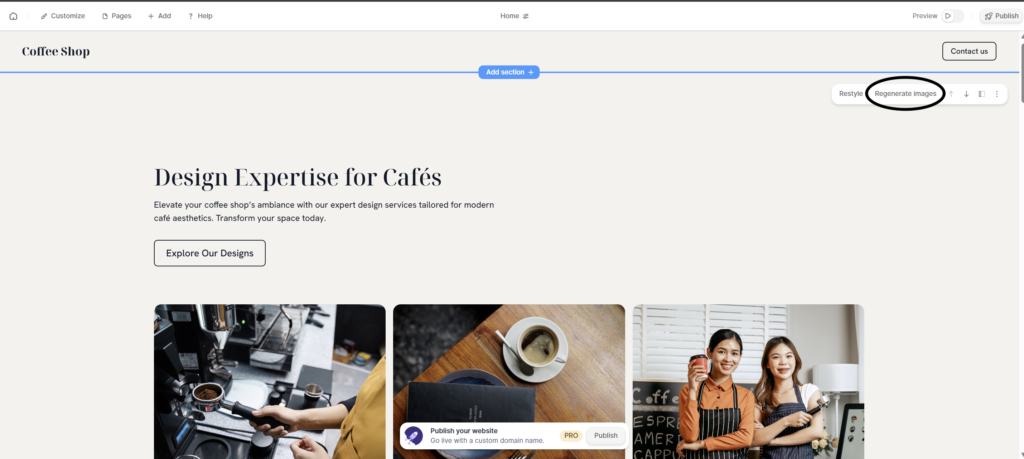
Step 3: Use the Regenerate Button
This is where AI really saves time.
- If you don’t like a headline, click on it and press Regenerate.
- If an image doesn’t match your brand, regenerate the image.
- You can regenerate individual sections without rebuilding the entire website.
Within seconds, the AI will show you new variations until you find something you like.
Step 4: Add Your Human Touch (Very Important)
AI can create structure and content, but it doesn’t know your story. This step is what makes your website feel real and trustworthy.
- Rewrite the About Us section in your own words and share your real story.
- Replace AI-generated images with photos of your actual team, workspace, or products.
- Double-check contact details like email, phone number, address, and social media links.
- Adjust wording so it sounds natural and matches your brand voice.
This human touch is what separates a good website from a great one.
Conclusion:
Friends, creating a website is no longer a big or complicated task. In 2026, if your business doesn’t have a website, it almost feels like your business doesn’t exist online.
And honestly, there are no more excuses now.
Short on budget?
Short on time?
Don’t know coding or design?
The best free AI website builders we discussed above solve all of these problems.
If you’re in a hurry and run a service-based business, Durable AI is the fastest way to get online.
If you want to sell products or build a serious online store, Wix AI gives you control and long-term scalability.
And if you’re creative and want your website to look premium and modern, Framer AI is the right choice.
My honest advice? Don’t overthink it. Try the free plans or trials of all three tools. Spend a little time with each one, and the tool that feels easiest and most comfortable for you will automatically become the best option.
Now it’s your turn.
Which of these AI website builders are you planning to try first? Or have you already used any of them before?
Tell me in the comments — I read and reply to every single one 😊
🚀 The website is ready, but what about the photos?
Congratulations! Your website structure is ready, but a good website feels incomplete without photos.
Are you thinking of buying expensive stock photos for your website? Or are you about to spend money on Midjourney? Wait!
We’ve compiled a list of Free AI image generators for you that deliver quality similar to Midjourney—For Free.
CLICK HERE👇
(In this guide, we’ve explained how you can create stunning banners and logos for your new website without spending $1 dollar.)
❓ Frequently Asked Questions (FAQ) – Best Free AI Website Builders (2026)
Q1. What are the best free AI website builders in 2026?
The best free AI website builders in 2026 include Durable AI for speed, Wix Studio (Wix AI) for control and scalability, and Framer AI for premium design. Each tool is built for a different type of user, so the “best” one depends on your needs.
Q2. Can I really build a website without coding using AI?
Yes, absolutely. Modern AI website builders are designed for non-technical users. You just describe what you want, and the AI creates the layout, content, and design for you. No coding or design skills are required.
Q3. Are free AI website builders good enough for real businesses?
Yes. Many small businesses, freelancers, coaches, and creators are already using the best free AI website builders. While free plans may have some limitations, they are more than enough to launch a professional and functional website.
Q4. Which AI website builder is best for beginners?
Durable AI is one of the best options for beginners because it is extremely simple and fast. You can generate a complete website in minutes without feeling overwhelmed by features.
Q5. Can I create an online store using AI website builders?
Yes. Wix Studio (Wix AI) is especially strong for e-commerce websites. It allows you to manage products, payments, and orders while still using AI to speed up the design and content process.
Q6. Are AI Website Builders free to use?
Most AI Website Builders offer free trials or basic free plans. However, to use custom domains and advanced features, you may need a paid plan starting around $10–$20 per month.
Q7. Can I build an e-commerce website using AI Website Builders?
Yes. Tools like Wix AI are excellent for e-commerce websites. You can add products, payment gateways, inventory, and even AI-written product descriptions.
Q8. Are AI-built websites mobile-friendly?
Yes, 100%. Modern AI Website Builders automatically create responsive websites that work perfectly on mobile, tablet, and desktop devices.





One Comment